

The Contentfry Uploader API lets you push user-generated content (UGC) such as contest photos, videos, and text directly into a uploader or ugc connection.
Previously, we recommended feeding Contentfry with an RSS feed. This still works and is ideal when you already expose an RSS feed. However, for real-time flows from external systems (contest platforms, CRMs, automation tools), the direct uploader API is the preferred way.
If you want to continue using RSS, see the dedicated guide at guides/rss.
When to use the Uploader API
Use the uploader API when:
- You receive content from external systems (e.g. contest platforms, surveys, microsites) and want to publish it to a Contentfry wall.
- You want real-time or near real-time updates on your displays.
- You already have public media URLs (image or video) or text content that should appear as posts.
The API supports:
- External image URLs (
image_url) - External video URLs (
video_url) - Text-only posts (
description) - Optional metadata such as
title,user_name,location_name, andexternal_idfor deduplication.
Prerequisites
-
Access token from the Contentfry Dashboard
Team Settings → API Tokens. You will use this token either as:- Bearer token:
Authorization: Bearer YOUR_TOKEN, or - Query string parameter:
?access_token=YOUR_TOKEN
- Bearer token:
-
Room ID
The ID of the room you want to push content into. You can retrieve it via:GET /roomsGET /rooms/{room-id}
-
Connection ID
The ID of the target uploader or ugc connection in that room. You can retrieve connections from:GET /rooms/{room-id}(seeconnectionsin the response).
These endpoints are described in the general API reference.
Endpoint overview
HTTP method and URL
POST https://graph.contentfry.com/v2.0/ugc/{room}/connections/{connection}/uploaderroom: Room ID (path parameter)connection: Connection ID (path parameter), whosesourceisuploaderorugc
Authentication
- Query parameter:
?access_token=YOUR_TOKEN - Or HTTP header:
Authorization: Bearer YOUR_TOKEN
Minimum required fields
At least one of the following request body fields is required:
image_urlvideo_urldescription
If you send image_url or video_url, the URL must be publicly reachable.
Request body
The request body uses JSON and follows the UgcUploaderPostRequest schema:
-
image_url(string, optional)
Publicly reachable image URL. -
video_url(string, optional)
Publicly reachable video URL. -
description(string, optional)
Text content of the post. -
link(string, optional)
Public permalink of the original post or entry. Use this when you want Contentfry posts to link back to the upstream submission for sharing. -
title(string, optional)
Post title, if you want to display a short headline. -
posted_at(string, optional)
ISO 8601 timestamp in UTC, e.g.2026-03-03T10:39:04Z.
Use this if you want the wall to show the original submission time from your upstream system. -
user_name(string, optional)
Display name of the submitting user (e.g. contest participant name). -
user_link(string, optional)
Link to the user profile or author detail page (if you have one).
This is different fromlink, which is the public URL of the post or entry itself. -
user_profile_image_url(string, optional)
Public URL to the user’s avatar/profile image. -
location_name(string, optional)
Human-readable location name (e.g.Zurich). -
latitude(number, optional)
Latitude coordinate. -
longitude(number, optional)
Longitude coordinate. -
external_id(string, optional)
Identifier from your upstream system (e.g. contest entry ID).
This is useful for idempotency/deduplication: when you send the sameexternal_idagain, Contentfry can avoid creating duplicate posts.
Example: Posting an external image URL
This example answers the common question:
Can we POST an external image URL to a Contentfry social wall via API?
Yes. Use the uploader endpoint with an image_url field. Example:
curl -X POST "https://graph.contentfry.com/v2.0/ugc/ROOM_ID/connections/CONNECTION_ID/uploader" \
  -H "Content-Type: application/json" \
  -H "Authorization: Bearer YOUR_TOKEN" \
  -d '{
    "image_url": "https://platform.contentfry.com/assets/common/images/placeholders/sample1.jpeg",
    "link": "https://example.com/contest/entries/viral_123",
    "description": "New contest photo submission",
    "title": "Photo Contest Entry",
    "user_name": "Contest Participant",
    "posted_at": "2026-03-03T10:39:04Z"
  }'
Replace:
ROOM_IDwith your room ID.CONNECTION_IDwith the ID of your uploader or ugc connection.YOUR_TOKENwith your Contentfry API token.
If the media URL is public and the token, room, and connection are valid, the post will be accepted and appear in your wall according to your moderation settings.
Example: Text-only post
You can also send text-only posts without media:
curl -X POST "https://graph.contentfry.com/v2.0/ugc/ROOM_ID/connections/CONNECTION_ID/uploader" \
  -H "Content-Type: application/json" \
  -H "Authorization: Bearer YOUR_TOKEN" \
  -d '{
    "description": "This is a text-only update from our campaign system."
  }'
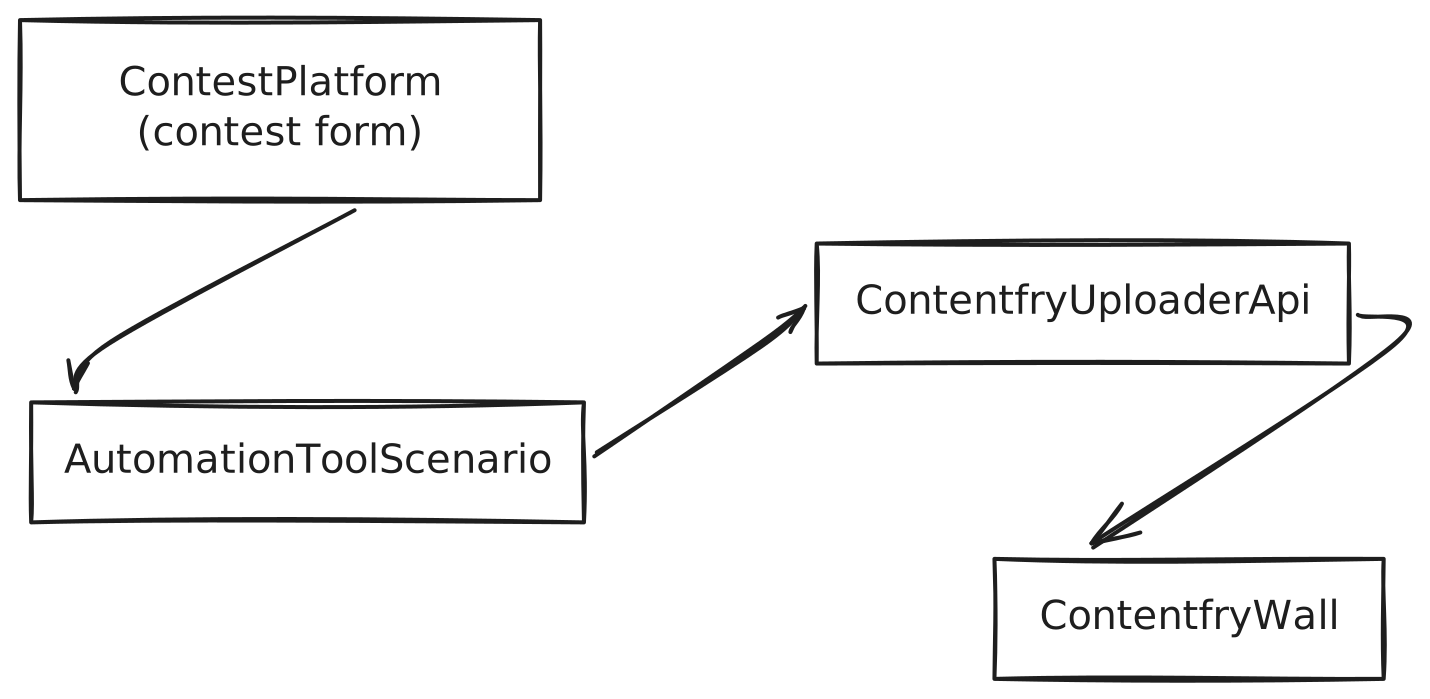
Example: Contest platform → Automation tool → Contentfry
Consider a typical flow where:
- A contest platform collects user-submitted photos and data.
- An automation tool (such as Make.com) receives a webhook for each new submission.
- The automation tool calls the Contentfry Uploader API to push the content into a wall in real time.
Field mapping
In such a setup, a recommended mapping is:
- Contest platform photo URL →
image_url - Contest platform video URL (if any) →
video_url - Contest platform entry or post permalink →
link - Contest platform caption or comment →
description - Contest platform participant name →
user_name - Contest platform profile or detail URL (if any) →
user_link - Contest platform profile image URL (if any) →
user_profile_image_url - Contest platform entry ID →
external_id - Contest platform submission timestamp →
posted_at(converted to ISO 8601 UTC)
Your Make.com scenario would:
-
Receive the webhook payload from the contest platform.
-
Transform the payload fields into the
UgcUploaderPostRequestschema. -
Perform an HTTP POST to:
https://graph.contentfry.com/v2.0/ugc/{room}/connections/{connection}/uploaderincluding the token and JSON body as shown in the examples.
This results in a fully automated, near real-time flow from the contest system into your Contentfry wall.
Data flow diagram
Responses
On success, the API returns a JSON body following UgcUploaderPostResponse:
-
success(boolean)
Indicates that the post was accepted. -
source_id(string)
Computed source identifier (MD5 ofexternal_idor based on a timestamp). -
post_ref(string)
Internal post reference, withuploader_orugc_prefix, e.g.uploader_0bbc5724ac9820dca307db3627b2fc16.
You can store source_id or post_ref if you later want to correlate posts back to your upstream system.
Error handling
If something is wrong (invalid token, missing required data, unreachable media URL, etc.), the API returns an error response following UgcErrorResponse / UgcError:
type(string) – error type, e.g.ApiMethodException.message(string) – human-readable error message, e.g.Invalid parameters.error_no(integer) – numeric error code.
For debugging and monitoring, log or capture all of these fields. If you are using an automation tool, make sure failed executions surface the error message and code so you can react (e.g. notify an admin or retry with corrected data).
See also
- RSS Feed ingestion:
guides/rss– use this if you prefer or already expose an RSS feed. - API reference: The full OpenAPI spec is available in the developer documentation powered by
static/v2/api/swagger.json, including theUgcUploaderPostRequestandUgcUploaderPostResponseschemas.